 Swipebird
Pocket Alternative: Where to Save Your Links and Posts Now
Mozilla shut down Pocket on July 8, 2025, after more than a decade as the default place to save things for later. If you used it, you need somewhere new for the links you save every day. The right replacement depends on what you saved most: long articles, or the posts, threads, reels and videos that now make up most people's saves.
Pocket shut down on July 8, 2025. Choose a replacement by what you save:
- Mostly long articles and newsletters: a reader app with a clean reading view, highlights and offline mode.
- Mostly social posts, threads, reels and ads: a swipe file that keeps the post itself and searches its words, such as Swipebird.
- A few links a week: the Reading list built into Chrome or Safari.
Whichever you pick, choose one that keeps a copy of what you save, not only the link.
What happened to Pocket
Pocket started as Read It Later, was renamed Pocket, and was bought by Mozilla in 2017. It was built into Firefox and used by millions of people to save articles from the browser and their phone.
In May 2025, Mozilla announced it would shut Pocket down. The app and browser extensions stopped working on July 8, 2025, and Mozilla said user data would be permanently deleted later in 2025. Mozilla said it was focusing its resources elsewhere, and that the way people save and read content on the web had changed.
That last point matters when you pick a replacement. Pocket was designed for long articles. Most of what people save today is shorter and lives inside social apps.
What Pocket users actually lost
Pocket's shutdown exposed a weakness in every "save for later" tool: your list lives on someone else's servers, and much of it is just links.
- The list itself, unless you exported it before the deletion.
- The organizing work: tags, favourites, highlights and archive history.
- The pages behind the links. Even a perfect export is a list of URLs, and some share of old links always stop working.
So when you compare replacements, ask one extra question: if this app closed next year, what would I still have?
How to choose a Pocket alternative
| Question | What to look for |
|---|---|
| What did you save most? | Articles point to a reader app. Posts, threads, reels and ads point to a swipe file. |
| Does it keep a copy? | A stored copy of the text and image survives a deleted page. A link does not. |
| Where is your data kept? | On your device, in the vendor's cloud, or both. On device keeps working if the service changes. |
| Can you search inside saves? | Every word, not only titles. |
| Can it pull in other saves? | Your LinkedIn, X and Instagram saves are a second "Pocket" you already have. |
| Can you get it back out? | Through sync, an AI connector or an export, so you are never stuck again. |
Pocket alternatives by what you save
For more on reader apps and how they differ from a swipe file, see our guide to read it later apps.
Swipebird: a Pocket alternative for posts, videos and links
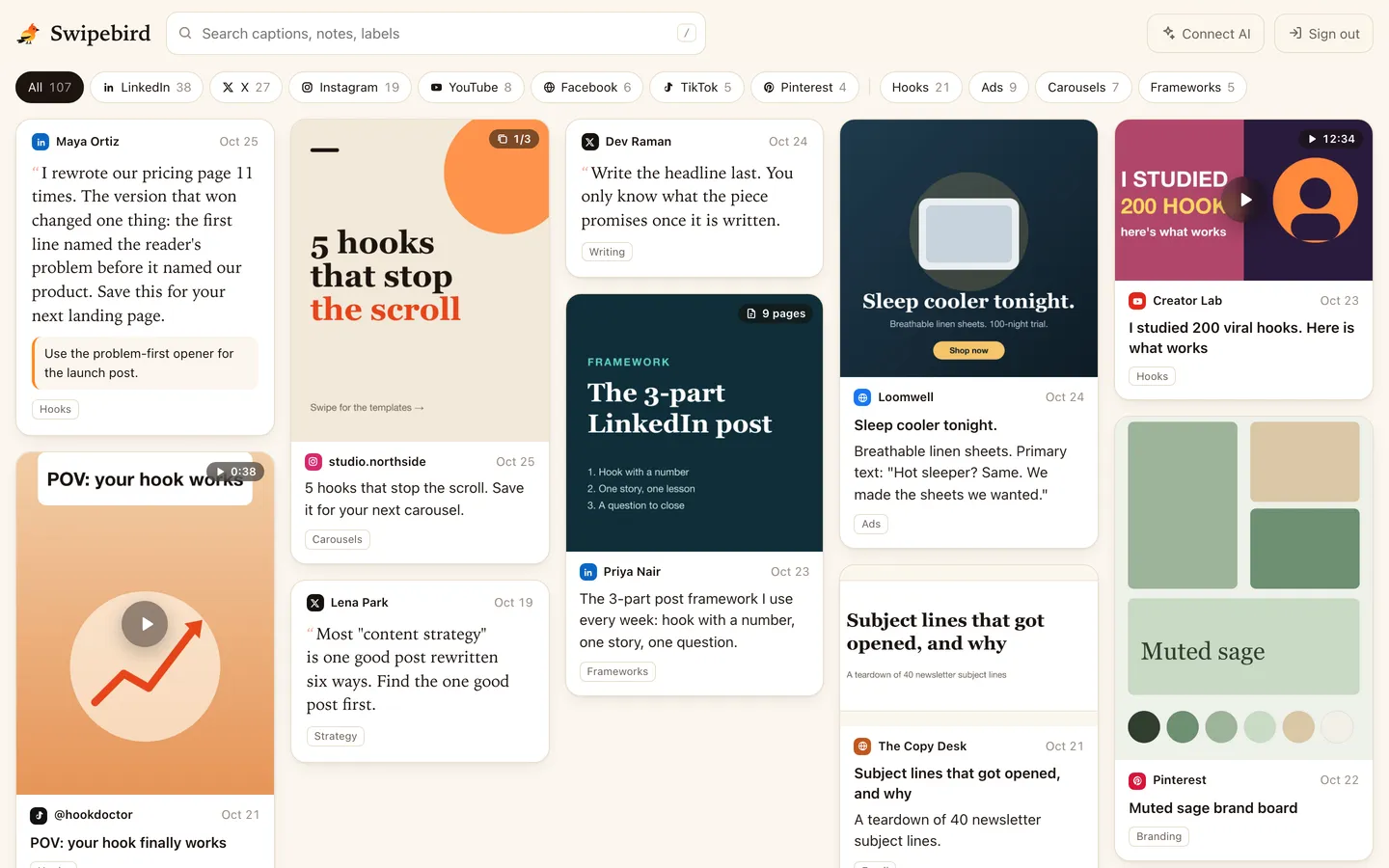
Swipebird is a swipe file for the things you save while scrolling. It is not a reader: it has no reading view or highlights. What it does well is the part Pocket never handled, social posts.
- One tap saving everywhere. On iPhone and Android, share any post, video, link, screenshot or text to Swipebird. In Chrome, use the side panel, the right-click menu or Alt + Shift + S.
- Works with LinkedIn, X, Instagram, YouTube, TikTok, Pinterest and any article. Each save is labelled by platform and type.
- Imports your platform saves. With the Chrome extension, open your LinkedIn saved posts, X bookmarks or Instagram saved page and click Pull all.
- Keeps a copy. Post text, author and image are stored with the save, so a deleted post is still readable in your library.
- Your data starts on your device. No account needed. If you choose Swipebird Pro, it syncs your saves across your phone, browsers and the web app.
- Your AI can reach it. Pro includes the AI connector, so Claude, ChatGPT or Cursor can search your saves and write from them.

Rebuilding your saves after Pocket
Swipebird does not import Pocket files. If you have a Pocket export, you can still use it well:
- Keep the export file somewhere safe. It is a record of what you cared about, even if you never import it.
- Skim it for the top few percent. Most saves were never opened. Pick the twenty to fifty you would genuinely miss.
- Re-save those as you meet them. Open each link and share it to your new tool. Dead links will show themselves.
- Bring in the saves you forgot you had. Your LinkedIn, X and Instagram saves are often bigger than your Pocket list was. Pull them into Swipebird in a few clicks.
- Start a light labelling habit. A handful of labels by use (hooks, ideas, to cite) beats a big folder tree.
Pocket alternative FAQ
Is Pocket shutting down?
Pocket has already shut down. Mozilla closed the app and extensions on July 8, 2025, and said user data would be deleted later in 2025.
Why did Pocket shut down?
Mozilla said it was focusing its resources on other products and that the way people save and consume content on the web had changed.
What is the best Pocket alternative?
It depends on what you saved. For long articles, a reader app with a clean reading view and offline mode. For social posts, threads, reels and ads, Swipebird, which imports your LinkedIn, X and Instagram saves and searches the post text. For a few links, your browser's Reading list.
Is there a free Pocket alternative?
Your browser's Reading list is free. Swipebird is free on your device with no account: save, import and search. Swipebird Pro adds sync and the AI connector.
Can I import my Pocket export into Swipebird?
No. Swipebird does not import Pocket files. Keep the export, re-save the links you still want, and import your LinkedIn, X and Instagram saves directly.
Can I still get my Pocket data?
Mozilla said Pocket data would be permanently deleted in late 2025. If you did not export it before then, check Mozilla's support page linked below for the current position.
How do I avoid losing my saves again?
Use a tool that keeps a copy of what you save, not only the link, stores it on your device as well as in the cloud, and gives you a way to get it back out.
Does Swipebird work in Firefox?
Swipebird's browser extension is for Chrome. On phones, use the iPhone or Android app with the share sheet.

Social content strategist. Junaid reached 1.1M impressions on X in about 10 weeks and has written about LinkedIn strategy for more than 3 years. He publishes the Hooked on LinkedIn newsletter.
Swipebird features described here were checked in the current apps. Facts about other products come from their own pages, linked below. Spotted a change? Email [email protected].
Sources
- Mozilla, Pocket shutdown notice: support.mozilla.org/en-US/kb/future-of-pocket
- Wikipedia, Pocket (service): en.wikipedia.org/wiki/Pocket_(service)