 Swipebird
What Is a Swipe File? Meaning, Examples and How to Build One
A swipe file is a collection of proven examples (ads, headlines, emails, posts, designs) that you keep so you never start from a blank page. Copywriters have kept them for decades in paper folders. Today most of the raw material sits in your LinkedIn saved posts, X bookmarks and Instagram saves. This guide covers what a swipe file is, what to put in one, how to organize it, and how to use it without copying anyone.
A swipe file is a personal collection of tested and proven work, such as ads, sales letters, headlines, emails and social posts, kept as a reference for ideas. You study why an example works, then apply the principle to your own work. You do not copy the words.
A good swipe file has three parts: examples you saved, labels that say what each one is good for, and search so you can find the right one in seconds.
Swipe file meaning
Wikipedia defines a swipe file as "a collection of tested and proven advertising and sales letters", kept by copywriters and creative directors "as a reference of ideas for projects". The word "swipe" is informal for taking something, and that is the point: you borrow the thinking behind work that already proved itself.
The definition has since widened well beyond sales letters. Designers keep swipe files of landing pages, marketers keep swipe files of ads, and social media writers keep swipe files of posts with hooks that stopped them mid scroll. The format changed. The job did not: shorten the distance between a blank page and a good first draft.
Where the idea comes from
Direct response copywriters made swipe files a habit. Before the internet, that meant folders and filing cabinets of ads and letters clipped from newspapers, magazines and the mail, often the ones that ran again and again (a sign they were making money). New copywriters were told to build one early and study it, sometimes by writing out great ads by hand to absorb their rhythm.
The practice moved online with everything else. Today the best examples flash past in a feed for a few seconds, which makes saving them fast, and finding them again later, the hard part.
What to put in a swipe file
Save anything that made you stop, click, reply or buy. If it worked on you, it is evidence. A useful swipe file mixes formats:
| Format | Save it for |
|---|---|
| Social posts (LinkedIn, X, Threads) | Hooks, story structure, line breaks, calls to comment |
| Carousels and reels | Cover lines, pacing, slide or scene order |
| Ads | Angles, offers, the first three seconds, the call to action |
| Emails and newsletters | Subject lines, openers, how they move to the link |
| Landing pages | Headlines, proof, objection handling, pricing page layout |
| Headlines and titles | Article, video and podcast titles that pull clicks |
| Data and quotes | Numbers and lines worth citing, with the source |
Save examples from outside your niche too. A pattern that is common in fitness content can feel fresh in B2B software.
Swipe file examples by job
Swipe file vs mood board vs bookmarks
| Swipe file | Mood board | Browser bookmarks | |
|---|---|---|---|
| Purpose | Reuse proven ideas in your own work | Set a visual direction | Get back to a page |
| What it keeps | The example itself, plus why it works | Images | A link and a title |
| How you find things | Search and labels by use | Browsing | Folders and title search |
| Lifespan | Years, it compounds | One project | Until the page dies |
For more on why bookmarks fail for posts, see our guide to a bookmark manager for social posts.
How to build a swipe file in an afternoon
1. Start with what you already saved
If you have used LinkedIn, X or Instagram for a while, you have hundreds of saves already. Those are the first draft of your swipe file. With the Swipebird Chrome extension, open your LinkedIn saved posts, X bookmarks or Instagram saved page and click Pull all. It copies each post's text, author and image, and skips anything you already have.
2. Make saving one action
The best swipe file is the one you actually add to. On iPhone or Android, share any post, ad, link or screenshot to Swipebird. In Chrome, use the side panel, the right-click menu, or Alt + Shift + S.
3. Label by use, not by topic
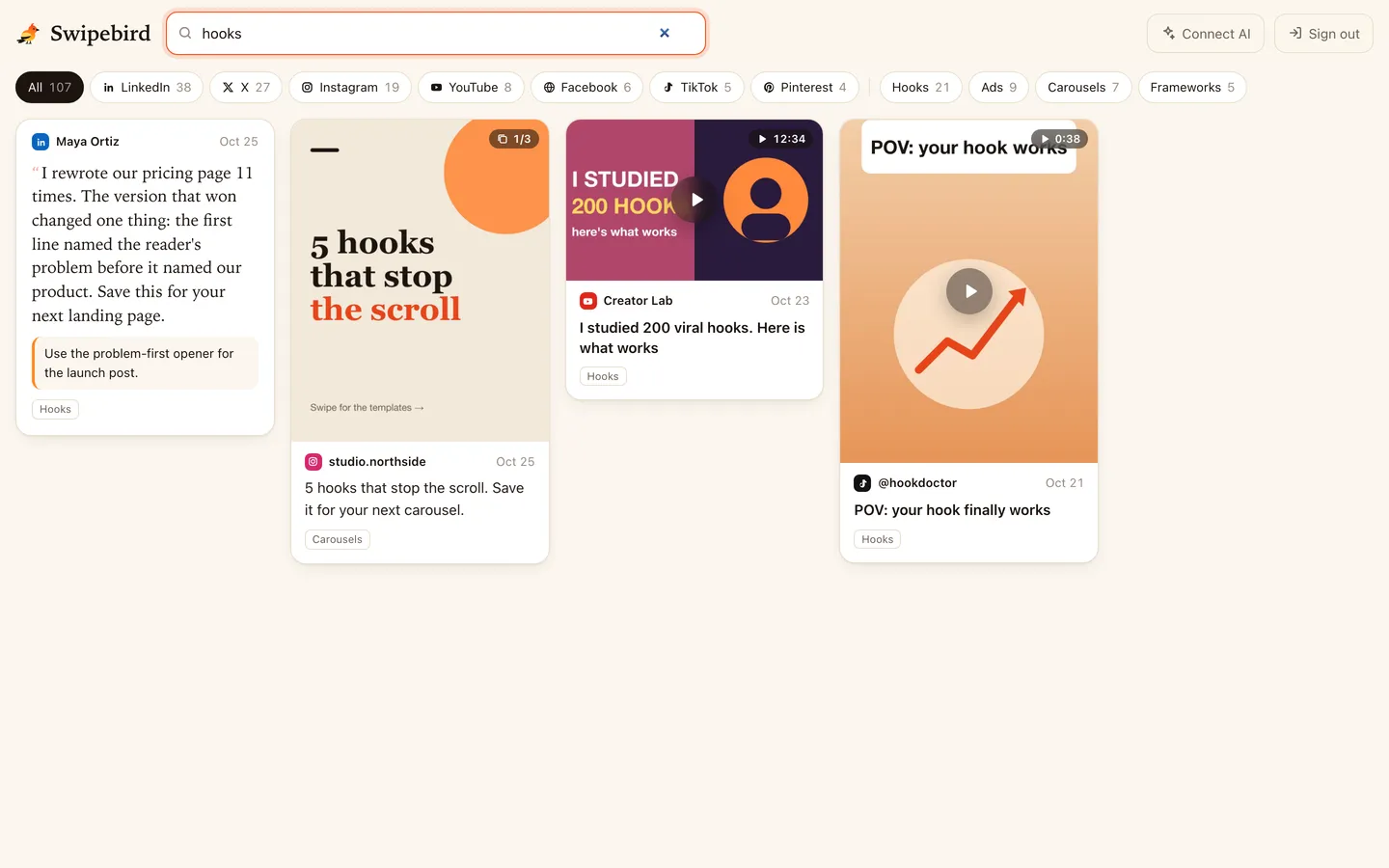
Labels that match the moment you go looking work best: hooks, carousels, story posts, offers, objections, ads to study. Keep it under ten labels. In Swipebird you can add labels and notes in the iPhone app, or ask your AI to label a batch for you.
4. Write one line on why it works
"Specific number in the first line." "Admits a weakness before the pitch." Months later, the note is what turns an example into a lesson.
5. Make it searchable
You will remember the idea, not the author or the date. Swipebird searches every word in captions, authors, notes and labels, so "cold email" finds the post even if you forgot who wrote it.

How to use a swipe file without copying
A swipe file is for studying, not pasting. The line is simple: borrow the structure, never the words.
- Pick the job first. "I need a hook for a post about pricing" is a search. "Find me something good" is a scroll.
- Pull three examples, not one. With one, you copy. With three, you see the pattern they share.
- Name the principle. A surprising number, a common belief turned around, a before and after.
- Write yours with your own story. Your experience, your numbers, your voice. The example only gives you the shape.
- Save your own winners. Your best performing posts belong in the swipe file too.
With Swipebird Pro, the AI connector lets Claude, ChatGPT or Cursor search your swipe file and do the first step for you:
Search my Swipebird saves for LinkedIn posts with a strong first line about hiring. Show me the three best, name the pattern each one uses, then draft a hook for my post using the same pattern and my own story.
Swipe file FAQ
What is a swipe file?
A personal collection of tested and proven work, such as ads, sales letters, headlines, emails and social posts, kept as a reference for ideas when you create your own.
Why is it called a swipe file?
Swipe is informal for taking something. Copywriters swipe the idea or structure behind work that already proved itself, not the exact words.
Is using a swipe file plagiarism?
Not when you use it the right way. Study the principle and structure, then write with your own words, story and data. Copying someone's text word for word is plagiarism, with or without a swipe file.
What should I put in a swipe file?
Anything that made you stop, click, reply or buy: social posts, ads, emails, subject lines, landing pages, headlines and data worth citing. Add a line on why each one works.
How do I organize a swipe file?
Label by use (hooks, offers, carousels, ads to study) instead of by topic, keep fewer than ten labels, favourite the best few, and make sure you can search every word.
What is a swipe file in marketing?
A library of marketing examples, such as ads, emails, landing pages and posts, that a marketer studies before creating a campaign, so the team starts from proven patterns instead of a blank page.
What is a good swipe file app?
One that imports what you already saved, keeps a copy of each example and searches its words. Swipebird does this for LinkedIn, X and Instagram saves plus any link, on Chrome, iPhone and Android.
Can I build a swipe file from LinkedIn saved posts?
Yes. With the Swipebird Chrome extension, open your LinkedIn saved posts and click Pull all. Every saved post comes in with its text, author and image, ready to label and search.

Social content strategist. Junaid reached 1.1M impressions on X in about 10 weeks and has written about LinkedIn strategy for more than 3 years. He publishes the Hooked on LinkedIn newsletter.
Swipebird features described here were checked in the current apps. Facts about other products come from their own pages, linked below. Spotted a change? Email [email protected].
Sources
- Wikipedia, Swipe file: en.wikipedia.org/wiki/Swipe_file
- Inc., New small business must have: a swipe file: www.inc.com/jessica-stillman/new-small-business-must-have-a-swipe-file.html
- The Guardian, Routes into copywriting: www.theguardian.com/careers/routes-into-copywriting-best-bits-from-the-live-q-a